Software Description
Overview
Software files high level overview:
core0.c / core0.h
DCC package detection & decoding
Programming mode (Modify and read CVs on programming track)
ADC-Offset measurement
core1.c / core0.h
PID motor controller
Back-EMF voltage measurement
shared.c / shared.h (used by both cores)
Error handling
Helper functions for retrieving CV’s
CV.h
Default configuration variables
CMakeLists.txt
CMake version, SDK version, C standard version
Board definitions
Compile/Build options
Sources files, header files
Debug logging configuration (via stdio using UART/USB)
Linked libraries
RP2040-Decoder-board-USB.h / RP2040-Decoder-board-Legacy.h
Flash Size
Pin definitions
LED pin when available
UART_TX/UART_RX pins when used for logging
DCC input pin
Motor Control PWM pins
ADC pins
post_build.cmake
Post build script for checking whether the size of the binary is within the limits of the flash size minus one sector (used for storing CVs).
pico_sdk_import.cmake
Helps to locate and import the Pico SDK
The Raspberry Pi Pico SDK is a dependency of the decoder software. The SDK provides abstraction to a higher level, so hopefully, in combination with the comments included in header and source files, the code is easy enough to understand.
Control Loop & Digital Controller

Control Loop - Block diagram
The block diagram above shows the (simplified) control loop. The actual digital controller block is explained below.
The Speed Helper block effectively sets the setpoint of the controller according to the CV configured acceleration and deceleration rates and actual target speedstep.
For feedback the back EMF voltage V_EMF is measured via voltage divider and ADC. V_EMF is proportional to the motor speed.
While the central component is the PID controller, there is an additional block called Feed-forward that has an impact on the control output variable. The Feed-forward block adds an additional offset to the output depending on the setpoint; this is done to achieve better control. A more detailed explanation regarding Feed-forward can be found below. The speed helper block corresponds to the speed_helper() function, which delays changing the setpoint according to the configured deceleration/acceleration rates.

Digital Controller - Block diagram
The controller is divided into two parts, depending on whether the motor is stationary or in motion. At all times either the startup controller or the PID controller is active.
The startup controller handles overcoming friction of the motor, and finding a base PWM level for overcoming friction. The base PWM level is equivalent to a certain PWM duty cycle. The base level gets saved and added to the output of the PID controller which handles motor control when the motor is in motion. This means the actual output of the PID controller is the sum of the PID output and the base PWM level. This is referred to as the feed forward block. The benefit of doing this is that the PID controller does not have to work in the non linear friction region of the motor, improving control performance.
Speed Table Initialization
The speed table is a crucial component of the motor control system, as it translates the 128 speed steps received from the DCC controller into specific setpoints for the PID controller. This table is initialized once at startup in the init_controller() function. The shape of the speed curve can be configured using three CV values: V_min (CV2), V_mid (CV6), and V_max (CV5).
V_min (CV2): Defines the starting voltage (setpoint) for the first speed step.
V_mid (CV6): Sets the voltage at the midpoint of the speed range (speed step 64).
V_max (CV5): Determines the maximum voltage at the highest speed step (126).
The speed table is calculated with two linear interpolations: one from V_min to V_mid and another from V_mid to V_max. This creates a two-segment linear speed curve, which allows for a non-linear relationship between the speed step and the motor voltage. For example, you can have a gentle acceleration at low speeds and a more aggressive one at higher speeds.
The speed_helper() function then uses this table to gradually adjust the setpoint based on the configured acceleration and deceleration rates.
Startup Controller
The startup controller is used when the motor is stationary to find the minimum PWM level required to overcome static friction. This process is not retained on a power cycle.
The initial PWM level for the startup sequence is determined as follows:
If previous successful startup levels are saved in memory, the controller calculates their average, \(\bar{b}\), and sets the initial PWM level to \(\frac{2}{3} \cdot \bar{b}\).
If no previous levels are saved, the ramp-up starts from a PWM level of 0.
From this starting point, the controller progressively ramps up the duty cycle until motor movement is detected. The ramp-up is not smooth but occurs in steps, with the step size determined by the maximum PWM level (which is a function of the PWM frequency).
If the PWM level reaches its maximum without motor movement, the controller reduces the starting level by half and retries, preventing excessive power to a stalled motor.
Once movement is detected (via back-EMF voltage), the current PWM level is saved as a new base value for future startups. This value is also multiplied by K_FF (from CV47) and used as the feed-forward term for the PID controller.
PID Controller

PID Controller
The block diagram above shows the PID controller in the s-domain. The derivative part contains an additional digital low-pass filter used to filter out high-frequency noise.
With \(T_s\) being the sampling time / controller update rate / time step of the discrete system. And \(\tau\) being the filter time constant of the digital filter
The continuous-time system representation can now be transformed into a discrete-time representation using bilinear transform \(s = \frac{2 \cdot (z - 1)}{T_s \cdot (z + 1)}\).
This results in the following difference equations which are then implemented in software:
Note
Instead of using the derivative of error, the derivative on measurement is used. This is done to prevent a high derivative part in the event of a large change in setpoint.
The previously explained base PWM is added to the actual output as well, meaning the formula above only shows the actual PID control part without feed forward.
Gain Scheduling
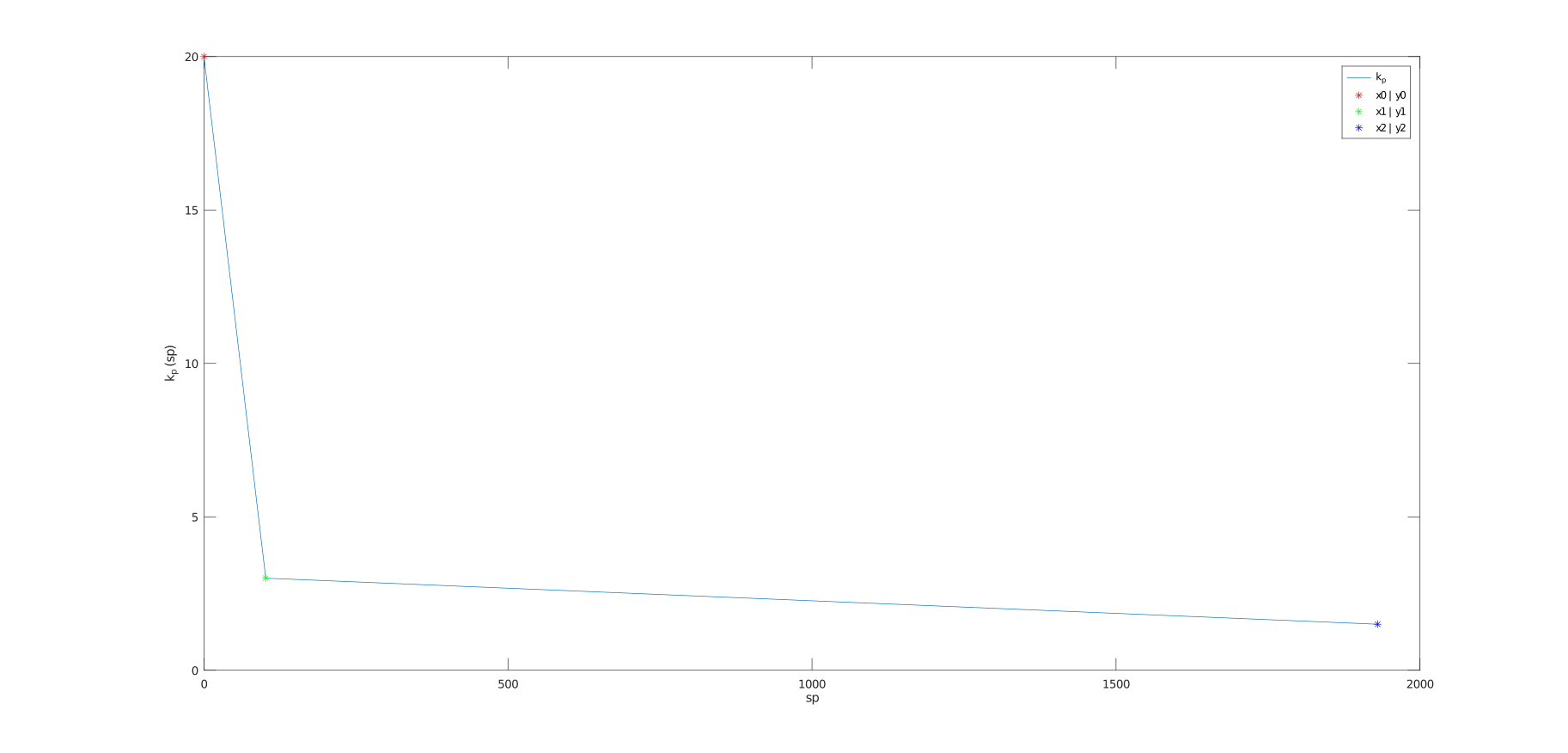
Gain Scheduling
Another aspect to consider is the implementation of gain scheduling. KP is a function of the current setpoint. Often it is favorable to have a higher proportional gain KP for slow speeds, achieving better control results. The illustration above shows the default setting for KP. CV_54 & CV_55 are used to set KP @ x0, CV_56 & CV_57 for KP @ x1, and CV_58 & CV_59 for KP @ x2. Additionally, CV_60 is used to shift x1 from the leftmost point (0% = 0/255) to the rightmost point (100% = 255/255).
The get_kp() function implements this gain scheduling. It calculates the proportional gain K_p based on the current setpoint sp. The function uses two different linear equations to determine K_p, depending on whether the setpoint is above or below the k_p_x_1 threshold. This creates a piecewise linear function for K_p, allowing for different gain characteristics at different speed ranges.
The parameters for these linear equations (k_p_m_1, k_p_m_2, k_p_y_0, k_p_y_1) are pre-calculated in the init_controller() function based on the corresponding CV values.
Feed-forward
As previously mentioned, to achieve better control, Feed-forward is used. In essence this means that the output of the PID controller is not only the sum of the proportional, integral, and derivative parts, but also the base PWM level. The base PWM level is set by the startup controller and is the PWM level at which the motor starts moving.
Speed Helper
The speed_helper() function is responsible for implementing smooth acceleration and deceleration. It is called by a repeating timer, with the interval configured by CV175. This function acts as a temporal filter for the speed setpoint.
Instead of instantly changing the motor’s setpoint to the new target speed step, the speed_helper() function gradually increments or decrements the current setpoint based on the acceleration (CV3) and deceleration (CV4) rates. These CVs determine how many calls to speed_helper() are needed for a single speed step change. For example, if the acceleration rate is set to 5, the speed_helper() must be called 5 times before the setpoint is incremented to the next speed step. This creates a time-based acceleration/deceleration curve.
The function also handles direction changes. If a direction change is detected, it will immediately jump to the new target speed without any delay, ensuring a responsive change in direction.
Back-EMF voltage measurement
To provide a feedback signal proportional to the motor speed, the ADC is used to measure the Back-EMF voltage. The measurement works by setting the PWM duty cycle to 0%, waiting for a certain delay time (CV_62), and then measuring x times (x = CV_61). The ADC input channel is selected based on the motor’s direction (forward or reverse). While measuring, the array with measurement values is sorted using insertion sort. Afterwards, y elements (y = CV_63) from the left (lowest values) and z elements (z = CV_64) from the right (highest values) will be dismissed to mitigate the impact of potential outliers in measurement. The average value of the remaining values will be computed and fed back into the control algorithm. Considering default settings (100us delay, 100 samples, ~2µs sampling time), the complete measurement run, including averaging, takes about 0.3ms to 0.35ms, which effectively reduces the maximum possible duty cycle to about 93% to 94%.
DCC signal decoding
The detection of the DCC signal works by looking at every rising and falling edge and calculating the time between them. When the time between rising and falling edge is greater than 87μs, then this is equivalent to “0”; otherwise, “1”. This value then gets shifted into a 64-Bit variable.
Decoding is done after every falling edge. It starts with an error detection, which, when not passed, dismisses the received command. Then the address will be decoded and compared to the address stored in the configuration. If the address matches, the command/instruction will be decoded.
Only a few instructions are currently implemented; only 128 speed step instructions are supported.
Implemented instructions:
0011-1111- (128 Speed Step Control) - 2 Byte length10XX-XXXX- (Function Group Instruction) (F0 - F12)110X-XXXX- Expansion Instruction (F13 - F31)
All DCC instructions can be found in Section 9.2, 9.2.1, and 9.2.1.1 of the NMRA Communications Standard.